Explore IDS citations in a family
Exploring prior art IDS citations
ClaimMaster lets you download and review all cited patent references (i.e., patent numbers, patent publications) in a particular document, directory, patent application, the entire patent family, or an IDS citation group. The prior art references can be imported from PDF/text files or downloaded from Google Patents/Free Patents Online/EPO. You can also use the explorer tool to generate IDS forms for the selected references.
Getting Started
To explore IDS citations for a particular family, click on the USPTO Office Actions, Shells, and Forms menu, then Explore and Diff IDS References:

Feature Options
Once you select this option, the following window will show. Switch to the Prior Art Citations Explorer tab. The following options are available from this window:
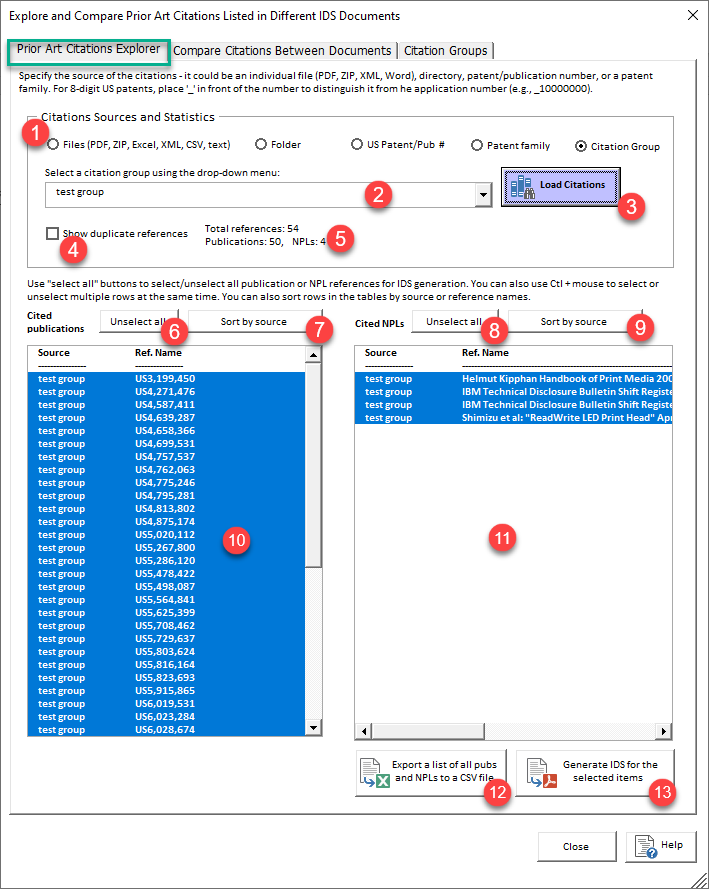
- Specify whether you want to view the list of references found in IDS files, in directories, or US patent/publications/applications, patent familes, or IDS citation groups.
- Files - files can be in PDF (e.g., the originally filed B08 forms), Word, or text formats.
- Directories - you can compare between forms in the specified directories (IDS forms in one directory vs forms in another directory).
- Patents/Pubs - specify patent or publication numbers and the tool will import prior art references from Google Patents/Free Patents Online/EPO.
- Patent Families - specify patent or application numbers and the tool will import prior art references for entire families from Google Patents/Free Patents Online/EPO.
- Citation Groups - lets you select the name and view a list of references configured for a particular IDS citation group (+Shell subscribers only)
- Using this field to specify files/directories/application #s/IDS citation group as the source of the IDS data.
- Click this button to load the citations from the specified source. Both cited publications and cited NPLs will be listed in their corresponding tables.
- If this checkbox is selected, the tool will show all the duplicate prior art citations (with their sources). This is a useful feature when analyzing a set of IDSs for a particular patent application (e.g., from file history downloaded from the Patent Center) or from a directory containing the native SB08a forms, as it gives you the ability to calculate the cumulative count of IDS citations for a set of IDSs, per 37 CFR 1.98(a)(1), for IDS fee calculation purposes. Each duplicate citation will have its duplicate index listed in parentheses at the end (e.g., "(1)"). For example, if there is "(4)" next to a particular publication, it means that there are at least 4 more duplicate entries with the same number.
- This section shows the statistics for all of the citations in the selected files/directory/patent/family/citation group. If "Show duplicate references" checkbox is selected, then the total # reflects the cumulative count of IDS citations in the group, per 37 CFR 1.98(a)(1), for IDS fee calculation purposes. However, this cumulative count does not take into consideration whether the duplicate citations were submitted in response to a non-compliant citation that was fixed by a duplicate re-submission (in this case, the two submissions will count as one). So further care must be taken when calculating the exact cumulative count if you are close to one of the 50, 100, and 200 fee size thresholds defined 37 CFR 1.17(v)

- Press this button to select/unselect all items in the cited publications table.
- Press this button to sort patent publication citations by their source
- This table contains all patent publication references that were extracted from the specified source (items 1 and 2). You can select all or just some items in the table. Use Ctl + mouse to select multiple rows at the same time.
- Press this button to sort NPL citations by their source
- Press this button to select/unselect all items in the cited NPLs table.
- This table contains all NPL references that were extracted from the specified source (items 1 and 2). You can select all or just some items in the table. Use Ctl + mouse to select multiple rows at the same time.
- Press this button to export the list of all patent references and NPLs to a CSV file.
- Press this button to generate the IDS form for the references selected in the patent publications and NPLs tables.