Integration with GenAI LLMs
ClaimMaster Integration With GenAI
ClaimMater can integrate with various generative AI Large Language Models ("LLMs"). LLMs generate coherent and contextually relevant text and image responses to given prompts, making them a helpful tool for various generative AI applications including patent drafting, document analysis, and figure generation. GenAI LLMs could be deployed in the cloud (e.g., GPT from OpenAI or Azure or Claude from Anthropic) or execute in a locally running application (e.g. Ollama). When interacting with a local LLM, your data remains completely private and is not sent to the cloud for processing. If you have data privacy concerns about cloud-based LLMs applications, using a local LLM in combination with ClaimMaster lets you have a completely private AI-enhanced patent drafting solution.
Specifically, ClaimMaster's patent drafting tools let you store and invoke helpful LLM prompts enriched with the text from your documents to describe figures, and also to generate, rewrite, summarize text. You can also attach files to textually describe figures, documents, and also generate figures. When connecting to the cloud-based GPT services, ClaimMaster will send and receive data to/from the selected LLM service using API directly from the computer where ClaimMaster is installed, without sending data for processing to any intermediate servers. According to OpenAI API policies , Azure OpenAI API policies, and Anthropic API policies, the use of API ensures that your prompts (inputs), completions (outputs), and any other transmitted data will not be available to other customers and will not be used to improve the models. To further enhance data privacy, you can also configure ClaimMaster with your own API key (OpenAI, Anthropic) and endpoint (Azure) to connect to private models set up in OpenAI, Azure OpenAI, or Anthropic services. If ClaimMaster is configured to access private LLMs using your API keys, those keys will be always stored in encrypted format on a machine where ClaimMaster is installed. When connecting to a local LLM application, your data remains completely private and is not sent to the cloud for processing.

To further enhance output from LLMs, ClaimMaster can also use a local database of documents to perform Retrieval Augmented Generation (RAG) when generating text. RAG is the process of retrieving relevant contextual information from a database of document snippets and passing that information to the LLM alongside the user’s prompt. This information is used to improve the LLM’s generated output by augmenting the model’s base knowledge. The RAG architecture in ClaimMaster uses semantic searching to find contextually relevant data based on the conceptual similarity of the input prompt and uses those vectors to search the vector database for the closest conceptual matches. As a result, when you send a prompt to LLM, ClaimMaster will first query its local vector database that contains your workspaces to find the most similar text snippets for your prompt and will then add those snippets to the final prompt of the configured LLM source to improve its output results.
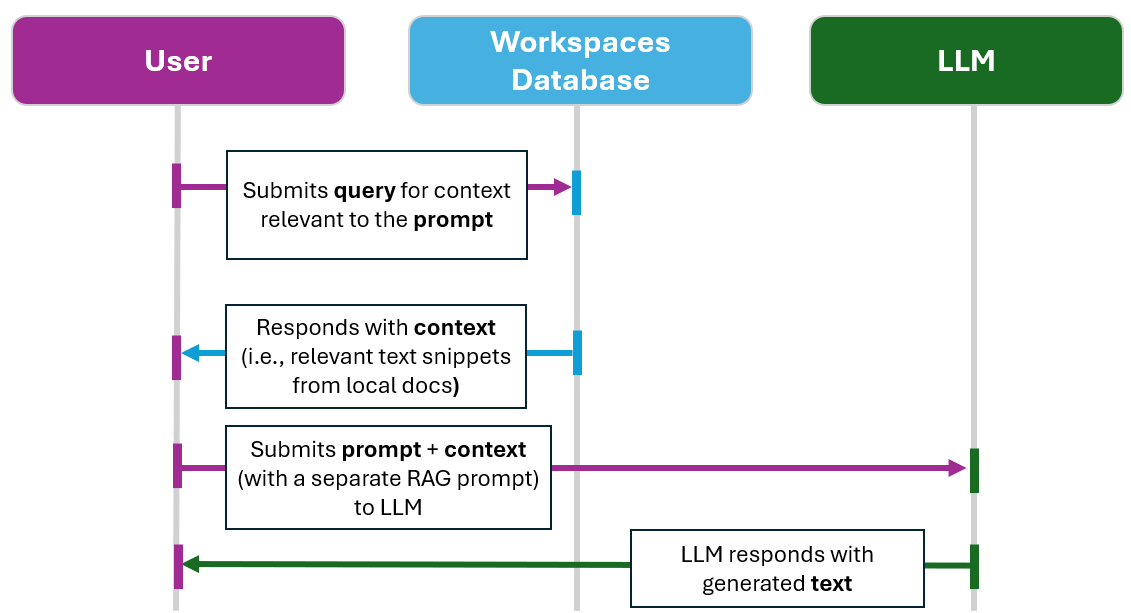
Basic ClaimMaster RAG workflow
When connecting to cloud-based GenAI service, you are responsible for determining whether OpenAI API policies , Azure OpenAI API policies, or Anthropic API policies, suit your needs, satisfy your organization's security requirements, and assume all risk for using GenAI services with your confidential data. All GenAI features in ClaimMaster will only transmit data to LLM after your explicit command. You control exactly what data is being sent to the configured LLM. It's also a good practice to always review LLM responses for factual correctness, especially if you are using prompts with settings for higher response randomness/creativity.
To explore our LLM tools in more detail, click on the links below: