Setting background processing for all-in-one reports
Background processing for all-in-one reports
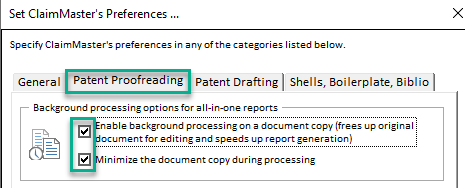
You can configure ClaimMaster to perform its proofreading operations in the background, while allowing you to continue editing the existing document. Specifically, ClaimMaster will create a snapshot of the existing document (as a separate Word process) and run all proofreading checks on that document, presenting the report when all of the proofreading steps are finished. Using this option would be helpful for very large Word documents that take a while to process, allowing you to continue working in Word on the existing document without interruption. The copy document will be minimized during background all-in-one report generation by default, unless you specify to keep it open for processing.
Getting Started
To enable background processing for all-in-one reports, perform the following steps:
- In Word 2007 or later, from the ClaimMaster Ribbon, click on the Preferences, Extra Tools, Help menu, then Preferences menu.

- Next, switch the "Patent Proofreading" tab and check "Enable background processing on a document copy" option: