Application sections gallery settings
Configuring your application section gallery settings
ClaimMaster allows you to use a stand-alone document for storing a table of application sections. You can share this document with others. Configuration of application section gallery is similar to other boilerplate tools in ClaimMaster, but application sections are stored in a separate file from the other boilerplate entries.
Getting Started
To configure the non-default location of the application gallery file, perform the following steps:
- From the ClaimMaster Ribbon, click on the Patent Drafting Tools menu, then select the Boilerplate file location and click Reload:

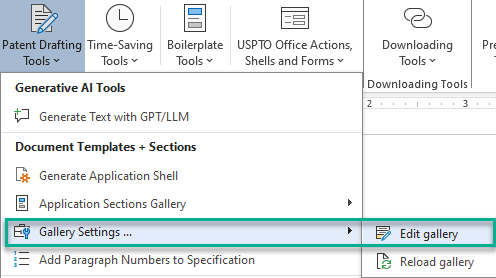
In addition, if you'd like to edit the Boilerplate table (you can also just open and edit the file directly in Word), click on Patent Drafting Tools->Gallery Settings and then click on Edit gallery, which will open the configured application gallery file for editing:
Configuring the application sections
Application gallery is kept in a table that defines various boilerplate entries. To add an entry to the table, add a row to the table, then fill-in the "Main Category" and "Sub-Category" cells with a unique names (this will be the category/sub-category of the boilerplate item in the gallery; each name must be 32 characters or less due to Word's limitations) and fill in the "Boilerplate Entry Text" item (this will be the actual boilerplate text). The cells in the "Boilerplate Entry Text" column can include text formatting and images.
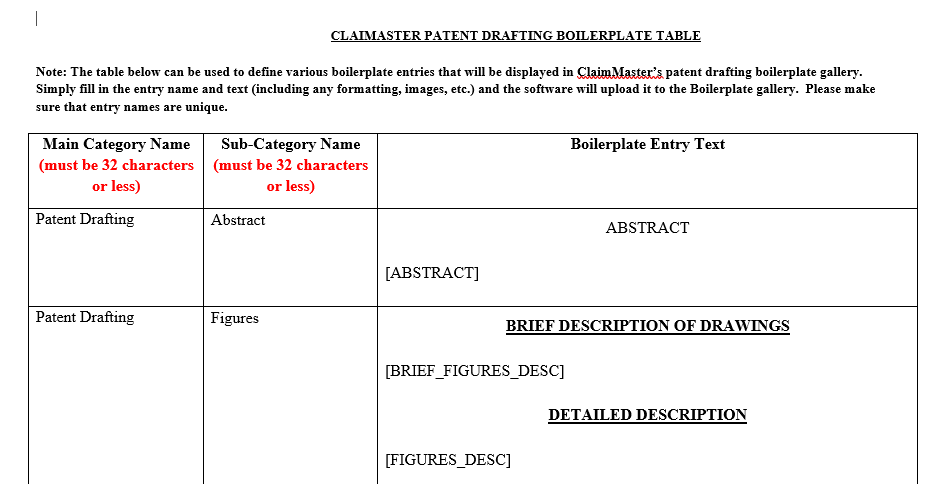
You can also include various replacement fields in the boilerplate text:
- [SUMMARY] - a placeholder for the Summary section that can be filled out with the Summary generation tool.
- [BRIEF_FIGURES_DESC] - a placeholder for the Brief Description of Figures section that can be filled out with the Figures + descriptions generation tool.
- [FIGURES_DESC] - a placeholder for the figure descriptions section of the Specification that can be filled out with the Figures + descriptions generation tool.
- [FLOWCHARTS_DESC] - a placeholder for the flowchart descriptions section of the Specification that can be filled out with the Flowcharts + descriptions generation tool.
- [ORIGINAL_CLAIMS] - a placeholder for original claims (if using another document as the claim source).
- [CLONED_CLAIMS] - a placeholder for the cloned claims section that can be filled out with the claim cloning tool.
- [ABSTRACT] - a placeholder for the Abstract that can be filled out with the Abstract generation tool.
After you've edited the Word file, save it, and then reload the gallery by going Patent Drafting Tools->Gallery Settings and then Reload gallery:
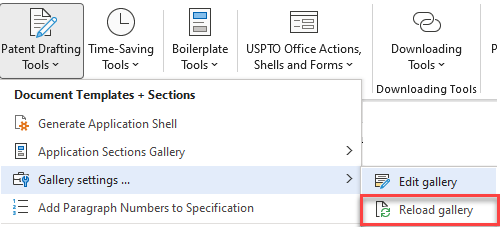
You can also reload the gallery from the Patent drafting settings window:
